Metronome

|

|

|
We'll need more research. And maybe a dance party.  The Cutting Room Floor has a section on Metronome. The Cutting Room Floor has a section on Metronome. |

|
Metronome (メトロノーム?, Metoronōmu)[1] can be accessed through Sequence Test in Rhythm Tengoku.


 21 (
21 (
Gameplay
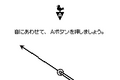
Here, the player must press as the needle passes over the bird on the top, playing basically the same as the first test in Rhythm-kan Check. The bird will flicker green to visually signify when the player is supposed to press A. It displays the following text:
 |
Translation
|
|---|---|
音にあわせて、Aボタンを押しましょう。
|
Press the A Button at the same time as the sound.
|
計測中
|
Measurement in progress
|
計測おわり! さて、結果は…
|
Measurement complete! Now, the results are...
|
During the measuring process, a counter appears on the top right, with "HI SCORE" written beneath it, having been repurposed later for Ura Otoko. Once it reaches 0, it gives the results, using the same screen as Rhythm-kan Check.
Controls
- : Activate bird
Timing Display
Appearances
Metronome
Video
Development History
- Main article: Metronome/Development
In Other Languages
| Language | Name | Meaning |
|---|---|---|
| Japanese |
メトロノーム | Metronome |